I. Scenario Description
When facing scenarios with large data volumes and full-text search requirements, in a distributed architecture system, setting up ElasticSearch is usually considered a conventional solution. In the Oinone system, the enhanced model is specifically designed to address such scenarios, with its underlying layer actually integrating ElasticSearch.
II. Background Introduction
- Gain a comprehensive understanding of ElasticSearch, covering content including but not limited to: Index, tokenization, Node, Document, Shards, and Replicas. For detailed information, refer to the official website: https://www.elastic.co/cn/.
- Ensure there is a usable ElasticSearch environment that meets the requirement for local projects to reference it.
III. Precondition Constraints
The enhanced model incrementally depends on real-time data change messages, so ensure the project's event is enabled and the mq configuration is correct.
IV. Steps to Introduce Search in the Project
(I) Adding Relevant Dependencies to the Boot Project
- The boot project needs to specify the ES client package version; not specifying the version will implicitly depend on the lower version specified by the top-level spring-boot dependency management.
- Add the project dependency of pamris-channel to the boot project.
<dependency>
  <groupId>org.elasticsearch.client</groupId>
  <artifactId>elasticsearch-rest-client</artifactId>
  <version>8.4.1</version>
</dependency>
<dependency>
  <groupId>jakarta.json</groupId>
  <artifactId>jakarta.json-api</artifactId>
  <version>2.1.1</version>
</dependency>
<dependency>
  <groupId>pro.shushi.pamirs.core</groupId>
  <artifactId>pamirs-sql-record-core</artifactId>
</dependency>
<dependency>
  <groupId>pro.shushi.pamirs.core</groupId>
  <artifactId>pamirs-channel-core</artifactId>
</dependency>(II) Adding Relevant Dependencies to the API Project
Add the dependency on pamirs-channel-api in XXX-api.
<dependency>
  <groupId>pro.shushi.pamirs.core</groupId>
  <artifactId>pamirs-channel-api</artifactId>
</dependency>(III) YML File Configuration
Add the configuration in the application-dev.yml file of pamirs-demo-boot: add channel to pamirs.boot.modules, that is, add the channel module to the startup modules. Meanwhile, pay attention to the ES configuration to ensure it matches the ES service.
pamirs:
  record:
    sql:
      #改成自己本地路径(或服务器路径)
      store: /Users/oinone/record
  boot:
    modules:
      - channel
      ## 确保也安装了sql_record
      - sql_record
  elastic:
url: 127.0.0.1:9200Note: For more YAML configurations, please refer to Module API.
(IV) Adding Module Dependencies to the Project's Modules
XXXModule adds a dependency on ChannelModule.
@Module(dependencies = {ChannelModule.MODULE_MODULE})(V) Adding an Enhanced Model (Example)
package pro.shushi.pamirs.demo.api.enhance;

import pro.shushi.pamirs.channel.enmu.IncrementEnum;
import pro.shushi.pamirs.channel.meta.Enhance;
import pro.shushi.pamirs.channel.meta.EnhanceModel;
import pro.shushi.pamirs.demo.api.model.ShardingModel;
import pro.shushi.pamirs.meta.annotation.Model;
import pro.shushi.pamirs.meta.enmu.ModelTypeEnum;

@Model(displayName = "Test EnhanceModel")
@Model.model(ShardingModelEnhance.MODEL_MODEL)
@Model.Advanced(type = ModelTypeEnum.PROXY, inherited = {EnhanceModel.MODEL_MODEL})
@Enhance(shards = "3", replicas = "1", reAlias = true, increment = IncrementEnum.OPEN)
public class ShardingModelEnhance extends ShardingModel {
    public static final String MODEL_MODEL = "demo.ShardingModelEnhance";
}(VI) Restarting the System to See the Effect
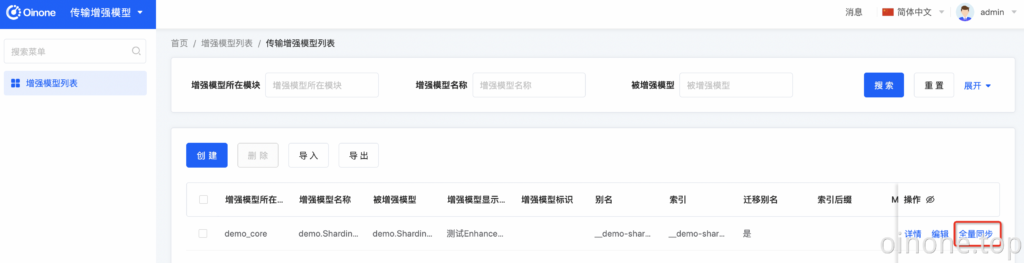
- Enter the [Transport Enhanced Model] application, visit the enhanced model list, and you will find a record. Click [Full Synchronization] to initialize ES and perform a full dump of data.
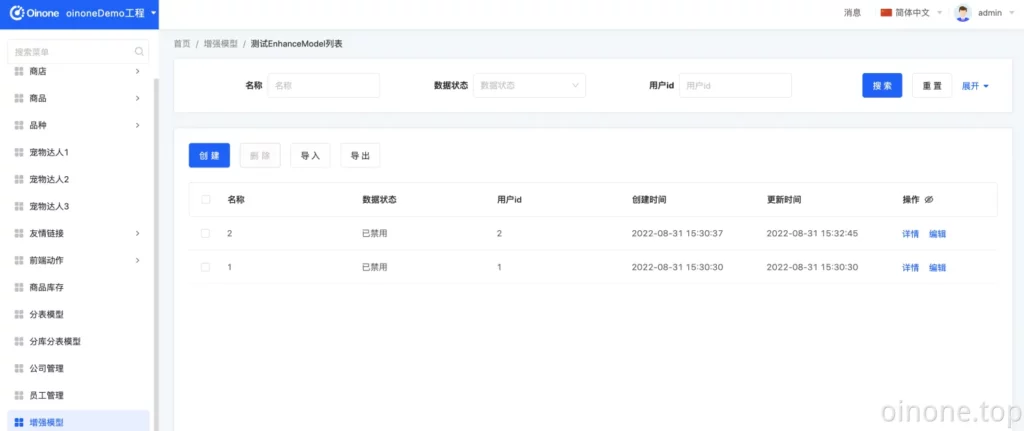
- Return to the Demo application again, enter the enhanced model page, and you can normally access and perform CRUD operations.
V. Personalized Dump Logic
Generally, dump logic has personalized requirements, so we can override the synchronize method of the model. The function overriding feature has been described in detail in the "Object-Oriented - Inheritance and Polymorphism" section.
(I) Overriding the synchronize Method of the ShardingModelEnhance Model
After overriding, if old data records need to automatically fill in new fields, you can enter the [Transport Enhanced Model] application, visit the enhanced model list, find the corresponding record, and click [Full Synchronization].
package pro.shushi.pamirs.demo.api.enhance;

import pro.shushi.pamirs.channel.enmu.IncrementEnum;
import pro.shushi.pamirs.channel.meta.Enhance;
import pro.shushi.pamirs.channel.meta.EnhanceModel;
import pro.shushi.pamirs.demo.api.model.ShardingModel;
import pro.shushi.pamirs.meta.annotation.Field;
import pro.shushi.pamirs.meta.annotation.Function;
import pro.shushi.pamirs.meta.annotation.Model;
import pro.shushi.pamirs.meta.enmu.FunctionTypeEnum;
import pro.shushi.pamirs.meta.enmu.ModelTypeEnum;

import java.util.List;

@Model(displayName = "Test EnhanceModel")
@Model.model(ShardingModelEnhance.MODEL_MODEL)
@Model.Advanced(type = ModelTypeEnum.PROXY, inherited = {EnhanceModel.MODEL_MODEL})
@Enhance(shards = "3", replicas = "1", reAlias = true, increment = IncrementEnum.OPEN)
public class ShardingModelEnhance extends ShardingModel {
    public static final String MODEL_MODEL = "demo.ShardingModelEnhance";

    @Field(displayName = "nick")
    private String nick;

    @Function.Advanced(displayName = "Synchronize Data", type = FunctionTypeEnum.UPDATE)
    @Function(summary = "Data Synchronization Function")
    public List<ShardingModelEnhance> synchronize(List<ShardingModelEnhance> data) {
        for (ShardingModelEnhance shardingModelEnhance : data) {
            shardingModelEnhance.setNick(shardingModelEnhance.getName());
        }
        return data;
    }
}(II) Adding Personalized Logic to Search
In general, dump logic often has personalized requirements. In this case, we can override the synchronize method of the model. The function overriding feature has been described in detail in the "Object-Oriented - Inheritance and Polymorphism" section.
VI. Personalized Search Function
@Function(
    summary = "Search Function",
    openLevel = {FunctionOpenEnum.LOCAL, FunctionOpenEnum.REMOTE, FunctionOpenEnum.API}
)
@pro.shushi.pamirs.meta.annotation.Function.Advanced(
    type = {FunctionTypeEnum.QUERY},
    category = FunctionCategoryEnum.QUERY_PAGE,
    managed = true
)
public Pagination<ShardingModelEnhance> search(Pagination<ShardingModelEnhance> page, IWrapper<ShardingModelEnhance> queryWrapper) {
    System.out.println("Your personalized search logic");
    return ((IElasticRetrieve) CommonApiFactory.getApi(IElasticRetrieve.class)).search(page, queryWrapper);
}VII. Example of Personalized Search Function
@Override
@SuppressWarnings({"rawtypes"})
public <T> Pagination<T> search(Pagination<T> page, IWrapper<T> queryWrapper) {
    String modelModel = queryWrapper.getModel();
    if (null == modelModel || modelModel.isEmpty()) {
        return page;
    }
    ModelConfig modelCfg = PamirsSession.getContext().getModelConfig(modelModel);
    if (null == modelCfg) {
        return page;
    }
    String rsql = queryWrapper.getOriginRsql();
    if (StringUtils.isBlank(rsql)) {
        rsql = "id>0";
    }
    BoolQuery.Builder queryBuilder = ElasticRSQLHelper.parseRSQL(modelCfg, rsql);
    TermQuery isDeletedTerm = QueryBuilders.term()
    .queryName(IS_DELETED)
    .field(IS_DELETED).value(0)
    .build();
    BoolQuery.Builder builder = QueryBuilders.bool().must(new Query(queryBuilder.build()));
    builder.must(new Query(isDeletedTerm));
    String alias = IndexNaming.aliasByModel(modelModel);
    Query query = new Query(builder.build());
    log.info("{}", query);

    List<Order> orders = Optional.ofNullable(page.getSort()).map(Sort::getOrders).orElse(new ArrayList<>());
    int currentPage = Optional.ofNullable(page.getCurrentPage()).orElse(1);
    Long size = Optional.ofNullable(page.getSize()).orElse(10L);
    int pageSize = size.intValue();
    List<SortOptions> sortOptions = new ArrayList<>();
    if (CollectionUtils.isEmpty(orders)) {
        orders.add(new Order(SortDirectionEnum.DESC, ID));
        orders.add(new Order(SortDirectionEnum.DESC, CREATE_DATE));
    }
    for (Order order : orders) {
        sortOptions.add(new SortOptions.Builder()
                        .field(SortOptionsBuilders.field()
                               .field(order.getField())
                               .order(SortDirectionEnum.DESC.equals(order.getDirection()) ? SortOrder.Desc : SortOrder.Asc)
                               .build())
                        .build());
    }

    SearchRequest request = new SearchRequest.Builder()
    .index(alias)
    .from((currentPage - 1) * pageSize)
    .size(pageSize)
    .sort(sortOptions)
    .query(query)
    .highlight(_builder ->
               _builder.numberOfFragments(4)
               .fragmentSize(50)
               .type(HighlighterType.Unified)
               .fields("name", HighlightField.of(_fieldBuilder -> _fieldBuilder.preTags(ElasticsearchConstant.HIGH_LIGHT_PREFIX).postTags(ElasticsearchConstant.HIGH_LIGHT_POSTFIX)))
               .fields("documentNo", HighlightField.of(_fieldBuilder -> _fieldBuilder.preTags(ElasticsearchConstant.HIGH_LIGHT_PREFIX).postTags(ElasticsearchConstant.HIGH_LIGHT_POSTFIX)))
               .fields("keywords", HighlightField.of(_fieldBuilder -> _fieldBuilder.preTags(ElasticsearchConstant.HIGH_LIGHT_PREFIX).postTags(ElasticsearchConstant.HIGH_LIGHT_POSTFIX))))
    .build();

    SearchResponse<HashMap> response = null;
    try {
        log.info("ES search request parameters: {}", request.toString());
        response = elasticsearchClient.search(request, HashMap.class);
    } catch (ElasticsearchException e) {
        log.error("Index exception", e);
        PamirsSession.getMessageHub()
        .msg(Message.init()
             .setLevel(InformationLevelEnum.WARN)
             .msg("Index exception"));
        return page;
    } catch (IOException e) {
        log.error("ElasticSearch runtime status exception", e);
        PamirsSession.getMessageHub()
        .msg(Message.init()
             .setLevel(InformationLevelEnum.WARN)
             .msg("ElasticSearch runtime status exception"));
        return page;
    }

    if (null == response || response.timedOut()) {
        return page;
    }

    HitsMetadata<HashMap> hits = response.hits();
    if (null == hits) {
        return page;
    }

    TotalHits totalHits = hits.total();
    long total = Optional.ofNullable(totalHits).map(TotalHits::value).orElse(0L);

    List<HashMap> dataMapList = Optional.of(hits)
    .map(HitsMetadata<HashMap>::hits)
    .map(hitsMap -> {
        hitsMap.stream().forEach(highlightForEach -> {
            highlightForEach.highlight().forEach((key, value) -> {
                if (highlightForEach.source().containsKey(key)) {
                    highlightForEach.source().put(key, value.get(0));
                }
            });

        });
        return hitsMap;
    })
    .map(List::stream)
    .orElse(Stream.empty())
    .map(Hit::source)
    .collect(Collectors.toList());

    List<T> context = persistenceDataConverter.out(modelModel, dataMapList);

    page.setSize(size);
    page.setTotalElements(total);
    page.setContent(context);
    log.info("ES search request parameter return total,{}", total);
    return page;
}