I. Scenario Overview
When we need to display approval buttons in the list of a business model, we can complete the extension through customization. This allows direct clicking on the action button in business data to navigate to the workflow to-do detail page for handling approvals or filling out tasks.
II. Solutions
(Ⅰ) First, add the userTaskList field in the business data model to store the workflow to-do data of the record
java
@Model.model(DemoItem.MODEL_MODEL)
@Model(displayName = "Test Product")
public class DemoItem extends IdModel {

    @Field.one2many
    @Field(displayName = "Workflow Task List", store = NullableBoolEnum.FALSE, invisible = true)
    @Field.Relation(store = false)
    private List<WorkflowUserTask> userTaskList;
}(Ⅱ) Query the data of the current logged-in user in workflow tasks within the query method of business data
java
@Function.Advanced(type = FunctionTypeEnum.QUERY, displayName = "Query List", timeout = 50000)
@Function.fun(FunctionConstants.queryPage)
@Function(openLevel = {FunctionOpenEnum.LOCAL, FunctionOpenEnum.REMOTE, FunctionOpenEnum.API})
public Pagination<DemoItem> queryPage(Pagination<DemoItem> page, QueryWrapper<DemoItem> queryWrapper) {
    new DemoItem().queryPage(page, queryWrapper);

    List<Long> bizIds = page.getContent().stream().map(DemoItem::getId).collect(Collectors.toList());

    LambdaQueryWrapper<WorkflowUserTask> userTaskWrapper = new LambdaQueryWrapper<>();
    userTaskWrapper.setModel(WorkflowUserTask.MODEL_MODEL);
    userTaskWrapper.select(WorkflowUserTask::getId, WorkflowUserTask::getNodeDataBizId);
    userTaskWrapper.eq(WorkflowUserTask::getUserId, PamirsSession.getUserId())
    .eq(WorkflowUserTask::getModel, DemoItem.MODEL_MODEL)
    .eq(WorkflowUserTask::getStatus, WorkflowUserStatusEnum.ACTIVE)
    .in(WorkflowUserTask::getNodeDataBizId, bizIds);

    Pagination<WorkflowUserTask> userTaskPagination = new Pagination<>();
    userTaskPagination.setCurrentPage(1);
    userTaskPagination.setSize(200L);
    userTaskPagination.setSort(new Sort().addOrder(SortDirectionEnum.DESC, WorkflowUserTask::getCreateDate));

    List<WorkflowUserTask> userTasks = new WorkflowUserTask().queryListByWrapper(userTaskPagination, userTaskWrapper);
    Map<Long, WorkflowUserTask> map = userTasks.stream().collect(Collectors.toMap(WorkflowUserTask::getNodeDataBizId, v -> v, (a, b) -> a));
    page.getContent().forEach((item) -> {
        WorkflowUserTask workflowUserTask = map.get(item.getId());
        if (workflowUserTask != null) {
            item.setUserTaskList(Lists.newArrayList(workflowUserTask));
        }
    });
    return page;
}(Ⅲ) Drag a server-side action into the operation column in the interface designer
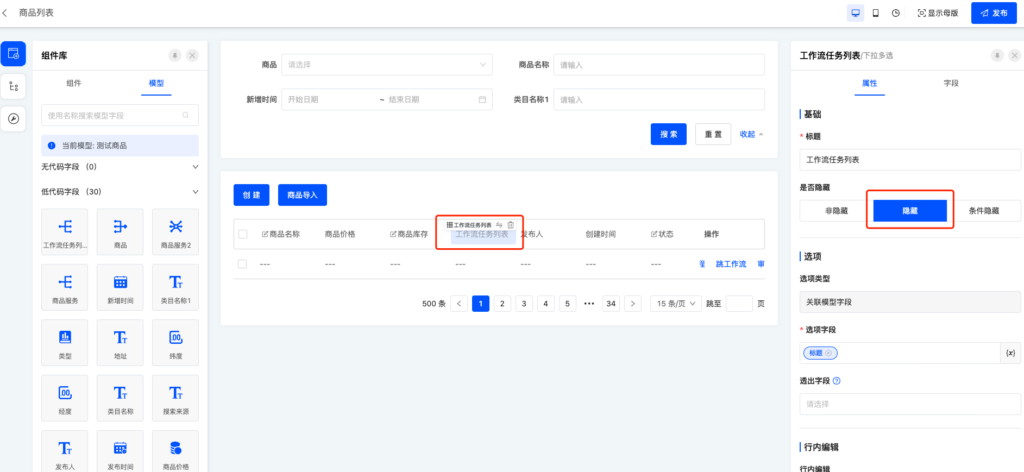
(Ⅳ) Drag the workflow task list field userTaskList into the table column and hide this field
(Ⅴ) Frontend custom action component for navigating to the workflow to-do detail page
typescript
import {
  ActionType,
  ActionWidget,
  ClickResult,
  executeViewAction, RuntimeViewAction,
  ServerActionWidget,
  SPI, ViewActionTarget, ViewType, Widget
} from '@oinone/kunlun-dependencies';

// name is the action name dragged from the interface designer
@SPI.ClassFactory(ActionWidget.Token({ actionType: ActionType.Server, model: 'demo.DemoItem', name: 'uiServer0358d42817d64fe7908fe48dfce084d3' }))
  class WorkflowJumpActionWidget extends ServerActionWidget {

    @Widget.Reactive()
    public get invisible(): boolean {
      if (!this.activeRecords?.[0]?.userTaskList?.[0]?.id) {
        return true;
      }
      return super.invisible;
    }

    protected async clickAction(): Promise<ClickResult> {
      const menu = {"selectedKeys":["WorkflowMenus_WorkBenchMenu_ActiveUserTaskMenu"],"openKeys":["WorkflowMenus_WorkBenchMenu","WorkflowMenus_WorkBenchMenu_ActiveUserTaskMenu"]};
      const userTaskId = this.activeRecords?.[0]?.userTaskList?.[0]?.id;
      if (!userTaskId) {
        return;
      }
      executeViewAction(
        {
          viewType: ViewType.Form,
          resModuleName: 'workflow',
          model: 'workbench.WorkBenchWorkflowUserTaskActive',
          name: 'workflow_wait',
          target: ViewActionTarget.OpenWindow,
          sessionPath: '/workflow/WorkflowMenus_WorkBenchMenu_ActiveUserTaskMenu'
        } as RuntimeViewAction,
        undefined,
        undefined,
        {
          id: userTaskId,
          menu: JSON.stringify(menu)
        }
      );
    }
  }